Here are two snippets I regularly use to install Docker with Docker Compose on my Debian systems, whether I have sudo or I’m root. Because I often need to search-and-replace sudo when I’m root, I’m posting them here – mostly for myself.
But if they’re helpful for you too, enjoy!
This was tested to work on Debian 11 (Bullseye), Debian 12 (Bookworm) and Debian 13 (Trixie).
This is based on the official installation instructions here.
Install with sudo
# Add Docker's official GPG key:
sudo apt update
sudo apt install ca-certificates curl -y
sudo install -m 0755 -d /etc/apt/keyrings
sudo curl -fsSL https://download.docker.com/linux/debian/gpg -o /etc/apt/keyrings/docker.asc
sudo chmod a+r /etc/apt/keyrings/docker.asc

# Add the repository to Apt sources:
echo \
  "deb [arch=$(dpkg --print-architecture) signed-by=/etc/apt/keyrings/docker.asc] https://download.docker.com/linux/debian \
  $(. /etc/os-release && echo "$VERSION_CODENAME") stable" | \
  sudo tee /etc/apt/sources.list.d/docker.list > /dev/null
sudo apt update

sudo apt install docker-ce docker-ce-cli containerd.io docker-buildx-plugin docker-compose-plugin -y

sudo systemctl status docker
Install as root (no sudo)
# Add Docker's official GPG key:
apt update
apt install ca-certificates curl -y
install -m 0755 -d /etc/apt/keyrings
curl -fsSL https://download.docker.com/linux/debian/gpg -o /etc/apt/keyrings/docker.asc
chmod a+r /etc/apt/keyrings/docker.asc

# Add the repository to Apt sources:
echo \
  "deb [arch=$(dpkg --print-architecture) signed-by=/etc/apt/keyrings/docker.asc] https://download.docker.com/linux/debian \
  $(. /etc/os-release && echo "$VERSION_CODENAME") stable" | \
  tee /etc/apt/sources.list.d/docker.list > /dev/null
apt update

apt install docker-ce docker-ce-cli containerd.io docker-buildx-plugin docker-compose-plugin -y

systemctl status docker
FAQ
Here are some frequently asked questions. If your question is not included here yet, just write a comment and I will try to swiftly answer it!
How do I check if Docker is running?
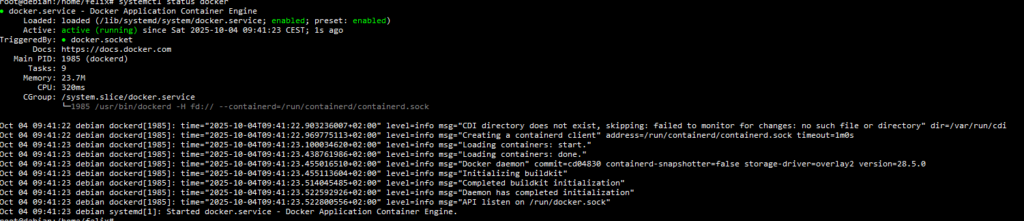
On Debian, using systemctl status docker, you should see a status message like this one, telling you everything is active (running).
How do I use Docker without being root / without sudo?
You need to add yourself to the docker group to use the docker commands without sudo, you can run the following command:
sudo /sbin/usermod -aG docker $USERYou will need to log out and back in to see its effects.